



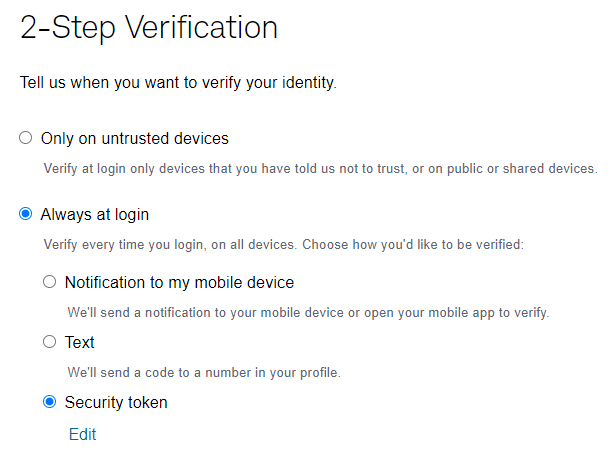
Financial institutions across the world are seeing an uptick in cybercrime, and Mission Wealth needs your help in protecting your personal technology devices and financial accounts. This article is intended to assist our clients with specific instructions for better protecting their investment accounts with Schwab.
Mission Wealth, along with our custodians Fidelity and Schwab, are committed to maintaining the integrity of our clients’ financial wellbeing. We understand that the digital aspect of financial security is increasingly critical. By staying informed and adopting robust cybersecurity practices, together we can navigate the complexities of the digital world, ensuring your wealth is not just managed wisely, but also protected robustly.
Other Resource Articles:
Navigating the 2024 Digital Terrain: Cybersecurity Tips to Protect Your Accounts
Cyber Scammers Continue to Target with Technology Advancements
How to Make Yourself a Difficult Target for Cyber Criminals
How to Reduce Your Cybersecurity Risk
As always, if you have any concerns about your financial security or need personalized advice, our team at Mission Wealth is here to help. Protecting your wealth is our top priority.
Contact us today for a free financial check-up or call (805) 882-2360.
Mission Wealth is a Registered Investment Adviser. This commentary reflects the personal opinions, viewpoints, and analyses of the Mission Wealth employees providing such comments. It should not be regarded as a description of advisory services provided by Mission Wealth or performance returns of any Mission Wealth client. The views reflected in the commentary are subject to change at any time without notice. Nothing in this commentary constitutes investment advice, performance data, or any recommendation that any particular security, portfolio of securities, transaction, or investment strategy is suitable for any specific person. Any mention of a particular security and related performance data is not a recommendation to buy or sell that security. Mission Wealth manages its clients’ accounts using a variety of investment techniques and strategies, which are not necessarily discussed in the commentary. Investments in securities involve the risk of loss. Past performance is no guarantee of future results.
KEY TAKEAWAYS
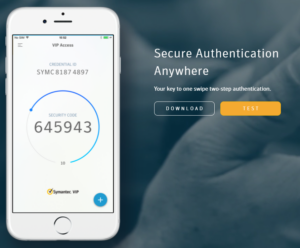
Cybercrime targeting financial accounts continues to grow, making multi-factor authentication a critical line of defense. Schwab clients can strengthen account security by enabling 2-step verification with the Symantec VIP app, updating to a long unique password, and reviewing all security settings. These straightforward steps dramatically reduce the risk of unauthorized access to your investment accounts.
Schedule a complimentary 30-minute discovery call to discuss your unique situation and financial goals.

"*" indicates required fields
By providing a telephone number and submitting the form, you are consenting to be contacted by SMS text message and agreeing to our privacy policy and disclaimers. Message frequency may vary. Message and data rates may apply. Reply STOP to opt out of further messaging. Reply HELP for more information.

Client Development Advisor
or call us: 805-902-4550
"*" indicates required fields
Schedule a complimentary 30-minute discovery call to discuss your unique situation and financial goals.
Prefer a phone call? Call us: 805-902-4550
For general inquiries: click here.
By providing a telephone number and submitting the form, you are consenting to be contacted by SMS text message and agreeing to our privacy policy and disclaimers. Message frequency may vary. Message and data rates may apply. Reply STOP to opt out of further messaging. Reply HELP for more information.